
Introduction
The "Asset Tax Report" interface shown in the image allows users to generate a report detailing tax information related to assets.
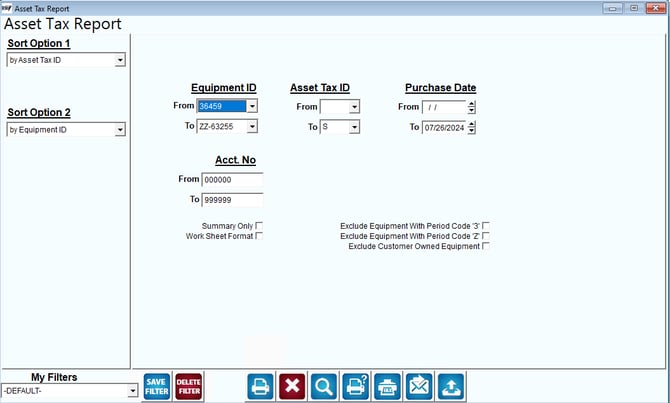
Fields:
Sort Option 1: By Asset Tax ID
Sort Option 2: By Equipment ID
Filtering Options
Equipment ID: Range from 36459 to ZZ-63255.
Asset Tax ID: Range from the selected start to end.
Purchase Date: From a specified start date to 07/26/2024.
Account Number (Acct. No.): Range from 000000 to 999999.
Additional Options
Summary Only: Generate a summary report.
Work Sheet Format: Generate the report in a worksheet format.
Exclude Equipment With Period Code '3'
Exclude Equipment With Period Code 'Z'
Exclude Customer Owned Equipment
Actions
Save Filter: Save the current filter settings for future use.
Delete Filter: Delete the current filter settings.
Generate Report: Print or export the report to various formats such as PDF, Excel, etc.
What the Report Generates
1. Asset Tax Information: Detailed tax information for assets within the specified criteria.
2. Summary or Detailed Report: Depending on whether the "Summary Only" or "Work Sheet Format" options are selected.
3. Filtered Data: Excludes equipment based on period codes or ownership status as specified.
Summary
This report helps users track and analyze asset-related tax data, providing options for detailed or summarized outputs, and allowing for specific exclusions based on equipment period codes or ownership status.