
Introduction
The Open Invoices Report allows you to view all of the unpaid invoices within each customer’s account.
NOTE: Open items are only available on accounts that have the ‘Open Invoice’ option selected within the Credit tab of Customer Information.
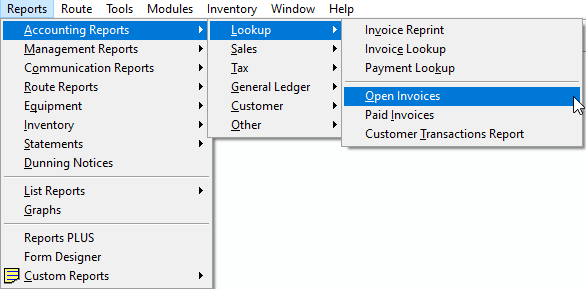
In RMA, navigate to Reports > Accounting Reports > Lookup > Open Invoices.
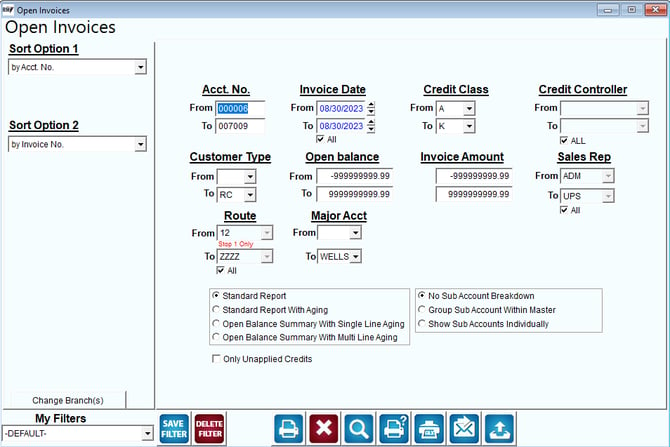
Fields:
Sort Option 1 & 2: The primary and secondary fields to sort by. You can choose from the following categories:
- Account Number
- Invoice Number
- Account Name
- Sales Rep 1
- Sales Rep 2
- Sales Rep 3
Account No: Enter the range of accounts to include in this report.
Invoice Date: Enter the range of invoice dates to include in the report.
Credit Class: Enter the range of credit classes to include in the report.
Credit Controller: Enter the range of Credit Controller Types to include in the report.
All: Check this box to include the full range of data for the Credit Controller fields.
Customer Type: Enter the range of Customer Types to include in the report.
Open Balance: Enter the range of open balances to include in the report.
Invoice Amount: Enter the invoice amount range to include in the report.
Sales Rep: Select the range of Sales Reps to include in the report.
Route: The range of Routes to include in the report.
Major Acct: Enter the range of Major Accounts to include in the report.
Standard Report: Select this option to include outstanding items on the indicated accounts in a single-line format.
Standard Report with Aging: Select this option to include outstanding items on the indicated accounts in a single-line format with an aged balance summary.
Open Balance Summary with Single Line Aging: Select this option to include an aged balance summary on the indicated accounts in a single-line format.
Open Balance Summary With Multi-line Aging: Select this option to include an aged balance summary on the indicated accounts in a multi-line detailed format.
No Sub Account Breakdown: Select this option to suppress detailed Sub Account information on the report.
Group Sub Account within Master: Select this option to include sub account detail under each master account on the report.
Show Sub Accounts Individually: Select this option to list sub accounts individually on the report.
Only Unapplied Credits: Check this box to only include credit invoices or unapplied payments on the report.